Image Sizes
Even if the media library accepts an upload of a very large file size, we don’t want to upload them so large because we will run out of storage/slow the site down when the images load.
How to Resize an Image:
In Photoshop you can go to File -> Export -> Save for web (legacy). Then at the bottom just above the save button, you can resize the image. Whatever you put in for the width will automatically adjust the height.
Images Sizes:
- The max width of an image you should ever need to upload to the website should be no larger than 2000px. (This is for large hero images).
- Medium-sized images should be around 600px – 900px wide
- Headshots should be about 900px x 900px
- Logos vary depending on the size needed, but upload a larger file size if need be so that the logo is clear and crisp.
In the Block Editor:
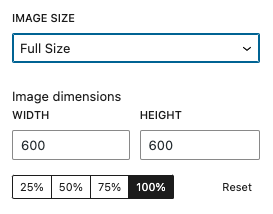
WordPress will also allow you to resize images or choose to use a thumbnail version. Click on the image then select your settings in the sidebar.